Showing posts with label linux. Show all posts

2012-02-23

Ubuntu for Android

Ubuntu Android add-on designed to replace PCs - Computerworld

Canonical has released a version of Ubuntu that can drive PC monitors from Android phones
IDG News Service - Canonical has unveiled software that will give Android smartphones the ability to run full desktop computer sessions on computer monitors and television sets.
"The processors at the heart of smartphones are approaching the power of low-end laptop processors, so we use the horsepower to power a desktop experience," said Canonical founder Mark Shuttleworth. "If you link your phone to a computer monitor and keyboard, then the phone can drive a full desktop session."

The company launched the software, called Ubuntu for Android, at the Mobile World Congress, being held this week in Barcelona.

The software works as an add-on to the Android mobile operating system, which is also based on Linux. When connected to a computer screen, keyboard and mouse, the software will launch a full desktop environment based on the Ubuntu Unity shell.

Ubuntu for Android | Ubuntu
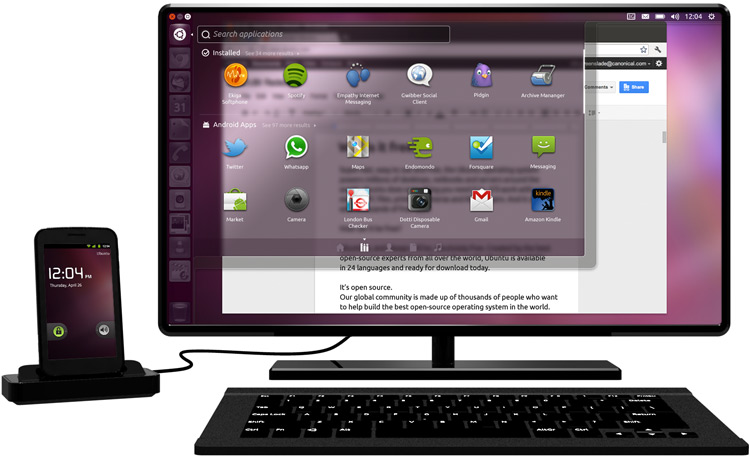

A full Ubuntu desktop, on your docked Android phone

  • Complete desktop solution for full productivity on docked Android phones
  • Easy to integrate with existing Android phones in development
  • Certified apps for business users from Adobe, Citrix, VMWare and more
  • Drives sales of multi-core phones with faster CPUs, more cores, more RAM and high-end graphics
  • Drive adoption of 4G handsets since office apps shine with low latency and higher bandwidth
  • Canonical leads in ARM Linux support, co-creator of Linaro with ARM
  • Target the enterprise thin client, and emerging market first-PC markets
  • Ubuntu and Android share the same kernel, running at the same time, accessing data and applications
  • The world’s favourite free desktop fully integrated with the world’s favourite open phone


Why Ubuntu for Android can succeed where others failed | Android Central

It's Ubuntu for Android, not Ubuntu on Android

Android runs on the Linux kernel. Ubuntu runs on the Linux kernel. We're looking at one kernel, with modules and drivers for all the hardware, and only the processes presented to the user change based on how the screen is being displayed. Plug your phone into a monitor through the HDMI output, and the processes that run to give you Android on your phone are suspended, and the processes that run to give you Ubuntu on the desktop are initialized. Make sense?
Doing it this way, your desktop experience isn't dependent on the Android OS running on your phone. In other words, it's not really Ubuntu on Android. It's Ubuntu with Android.
It's not a dual-boot solution either -- it's done dynamically and triggered when you plug in an external monitor. Because it's all running off the same kernel, you can just hop back and forth. That's the way it should be done.

2011-09-04

MeeGo: A Linux Platform for the Next Generation of Computing Devices

About | MeeGo
  • The MeeGo project provides a Linux-based, open source software platform for the next generation of computing devices. The MeeGo software platform is designed to give developers the broadest range of device segments to target for their applications, including netbooks, handheld computing and communications devices, in-vehicle infotainment devices, smart TVs, tablets and more – all using a uniform set of APIs based on Qt. For consumers, MeeGo will offer innovative application experiences that they can take from device to device.
  • The MeeGo project is hosted by The Linux Foundation

MeeGo - Wikipedia, the free encyclopedia

Overview

  • MeeGo is intended to run on a variety of hardware platforms including handhelds, in-car devices, netbooks and televisions.[10] All platforms share the MeeGo core, with different “User Experience” (“UX”) layers for each type of device.

System requirements

User interfaces


Screenshot of MeeGo’s Netbook UX


The Linux Foundation Video Site:: MeeGo - YouTube


Devices | MeeGo

MeeGo's common core supports development for a variety of devices.


2010-01-09

Marvell Plug Computer 3.0

clipped from www.techspot.com

Marvell unveils Plug Computer 3.0 with Wi-Fi, hard drive


Marvell has officially revealed the Plug Computer 3.0, an ultra-small, always-on, always-connected system capable of handling basic computing tasks. Powered by the 2GHz Marvell Armada 300 processor, the Plug Computer 3.0 features embedded Wi-Fi, Bluetooth, a storage drive, and is compatible with multiple Linux 2.6 kernel distributions.
clipped from www.youtube.com

Plug Computer @ CES 2010 - Guess what this is?

what is a plug computer ?
A plug computer is a tiny, low power server, intended to provide network-based services within the home.
It is an always-on system, and can serve data and applications to computing devices within the home. It can also be a bridge between home computing devices and Internet-based services.
clipped from www.marvell.com

Plug Computer

Based on the Kirkwood Series SoCs, Marvell's SheevaPlug is a plug computer that enables high- performance, always- on, always- connected, and environmentally friendly computing readily available for consumers and developers. A Plug plug Computer computer is designed to draw so such little power that it can be left on all of the time. Unlike other embedded devices in the home, it contains a gigahertz- class processor designed to offer PC- class performance.

clipped from www.tgdaily.com

Marvell's Plug Computer: A tiny, discrete, fully functional 5 watt Linux server

clipped from www.youtube.com

blog it

Sources:
  1. Marvell unveils Plug Computer 3.0 with Wi-Fi, hard drive - TechSpot News
  2. YouTube - Plug Computer @ CES 2010 - Guess what this is?
  3. Marvell: Plug Computer
  4. Marvell's Plug Computer: A tiny, discrete, fully functional 5 watt Linux server | TG Daily
  5. YouTube - Plug Computer - Think Small. Dream Big.
Related:
  1. Exclusive First Look: Plug Computer 3.0 - PC World
  2. Marvell Unveils Plug Computer 3.0 With Integrated Wireless and Built-in Hard Drive -- LAS VEGAS, Jan. 5 /PRNewswire-FirstCall/ --
  3. PlugComputer Community
  4. Marvell Plug Computer 3.0, Linux Microserver, ARM chip, WiFi, Bluetooth, HD always on home server platform - Green Data Center Blog
  5. Marvell super-upgrades its Plug Computer | CES 2010 - CNET
  6. Marvell upgrades Plug Computer to v3.0; NAS, smart grid applications | The Toybox | ZDNet.com
  7. Plug Computer 3 - Marvell Plug Computer 3.0

2009-08-29

Nokia N900 Linux-based Mobile Computer

clipped from www.heise.de
heise online

Nokia announces N900 mobile computer


With less than one week before the start of this years Nokia World in Stuttgart, Germany, Nokia has officially announced its new Maemo-based next generation Internet Tablet. The N900 isn't Nokia's first Internet Tablet (770, N800, N810), but it is the companies first that also includes a GSM and 3G/UMTS modem, making it a fully fledged smartphone. Previous models could only connect to the Internet via the built-in Wi-Fi connection or via a Bluetooth link to another mobile phone.

clipped from www.nokia.com
Nokia
null
Maemo 5 injects speed and power into mobile computing


August 27, 2009

The new Nokia N900: Computer-grade performance in a handset
Espoo, Finland - Nokia today marked the next phase in the evolution of Maemo software with the new Nokia N900. Taking its cues from the world of desktop computing, the open source, Linux-based Maemo software delivers a PC-like experience on a handset-sized device.

The Nokia N900 has evolved from Nokia's previous generation of Internet Tablets and broadens the choice for technology enthusiasts who appreciate the ability to multitask and browse the internet like they would on their desktop computer.

Running on the new Maemo 5 software, the Nokia N900 empowers users to have dozens of application windows open and running simultaneously while taking full advantage of the cellular features, touch screen and QWERTY keyboard.
clipped from www.youtube.com

Nokia N900 - Video Promo

clipped from www.youtube.com

N900 interaction documentary


blog it


clipped from maemo.nokia.com
Introducing Maemo 5

Maemo brings the power of computers to mobile devices. Designed with the internet at its core, Linux-based Maemo software takes us into a new era of mobile computing.

See the features

clipped from maemo.nokia.com
Raw computer power
At the heart of this mobile computer is its powerful 600 MHz processor and up to 1GB of application memory.
Raw computer power
The built-in 32 GB storage is big enough to store up to 7,000 of your favourite songs or 40 hours of DVD-quality video.
Raw computer power
For the first time get high-speed broadband that’s as fast as an internet connection at home.
Raw computer power
Capture vivid images and DVD-quality widescreen video with the integrated 5-megapixel camera.
Raw computer power
Powerful hardware packed into a sleek, compact design.
Raw computer power
Find your position quickly and accurately with the built-in Assisted-GPS receiver.
clipped from www.youtube.com

Maemo 5 user interface


blog it

Sources:
  1. heise online - Nokia announces N900 mobile computer
  2. Nokia - ShowPressRelease
  3. YouTube - Nokia N900 - Video Promo
  4. YouTube - N900 interaction documentary
  5. Maemo software | Nokia › The software behind your mobile computer
  6. Maemo software | Nokia › Nokia N900 mobile computer
  7. YouTube - Maemo 5 user interface
Related:
  1. An Early Peek at the Nokia N900 - Digits - WSJ
  2. Nokia N900 finally announced, is Linux-based
  3. maemo.org - maemo.org: Home of the Maemo community
  4. maemo.org - Intro: The Home of the Maemo Community

2009-08-23

Jolicloud The Free OS For Netbooks

clipped from arstechnica.com
Ars Technica: The Art of Technology

Hands-on with an alpha of the Jolicloud netbook distro

Jolicloud is a Linux-based netbook OS that is built on top of Canonical's Ubuntu Netbook Remix. It uses Mozilla's Prism environment to make Web applications accessible outside of the browser.

clipped from news.cnet.com
CNET.com

Preview of Jolicloud: The social Netbook OS

How it works

Jolicloud centers on a directory of applications that can be sorted by genre, release date, and popularity. To download or remove them from your computer, you just click on their icon and it does the rest. Jolicloud groups both Web apps and software programs under the same name umbrella, and both are added and removed from your system in the same manner. There's also a normal add and remove programs tool just like you get in Windows, but it's easier to do it from Jolicloud's rounded and simplistic interface.

To install or uninstall "applications" you can head to Jolicloud's online directory.

One of the big draws to Jolicloud is that it takes this list of apps you have installed and backs it up. If you have multiple computers running Jolicloud that share the same account, it syncs up those apps, including any log-ins or shared data. This puts less of an importance on what hardware you're using, meaning you can hop from machine to machine and get right back to what you were doing on the other.

blog it
clipped from www.jolicloud.com

Welcome to Jolicloud, a cool new OS for your netbook

clipped from www.jolicloud.com

Super Easy To Manage

Idea

A Social OS

Social notifications screenshot

Super Easy To Update

Personalized updates screenshot

Open To Popular Standards

Out-of-the-box experience

Optimized For Web Applications

Zoho Writer screenshot

Runs Linux, AIR and Windows applications

Spotify screenshot
clipped from www.youtube.com

Jolicloud Open O/S for Netbooks

http://www.netbooknews.com - Sascha Pallenberg does a full walk through of the Robby Alpha Release of Jolicloud, a new cloud O/S for Netbooks

blog it

Sources:
  1. Hands-on with an alpha of the Jolicloud netbook distro - Ars Technica
  2. Preview of Jolicloud: The social Netbook OS | Web Crawler - CNET News
  3. Jolicloud, a cool new OS for your netbook
  4. YouTube - Jolicloud Open O/S for Netbooks
Related:
  1. Jolicloud beta gets a thorough going over, Microsoft still not worried
  2. Jolicloud The Free OS For Netbooks Ready For Prime Time?